
What Is the Vault Professional Foundations Pack?
Vault Foundations is a structured, fixed-scope implementation package that helps engineering and manufacturing teams establish a centralized engineering data management environment using Autodesk Vault Professional.
It combines proven configuration workflows, predefined deliverables, and hands-on expert guidance into a single, predictable engagement — enabling your team to move from scattered file management to a reliable single source of truth, fast.
Duration: 4–6 weeks Delivery: Remote (onsite optional)
Why Vault Foundations Instead of a Custom Implementation?
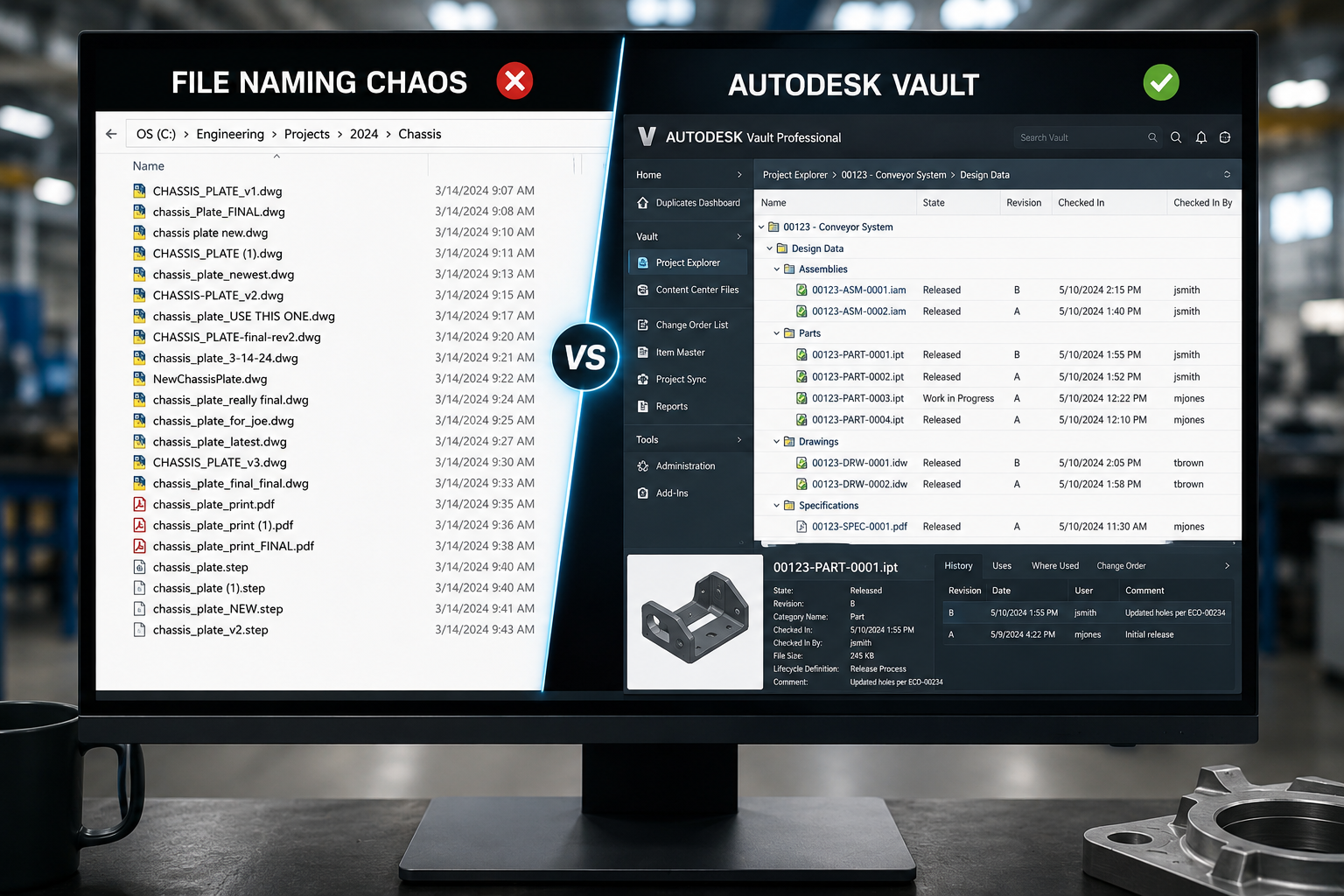
Custom implementations can drag on for months. And relying on shared drives or basic engineering file management software means version conflicts, lost files, and no real control.
Vault Foundations is built differently:
- Fixed-scope and fixed-cost
- Structured 6-week delivery roadmap
- Pre-built configuration frameworks based on real-world success
- Clear deliverables at every phase
- Training included — your team is ready to go from day one
The result: less risk, faster deployment, and a data management environment your engineering team will actually use.
Key Benefits of Vault Foundations
Predictable Investment
Know exactly what you’re paying upfront, no surprises, no scope creep.

Faster Time to Value
A structured 6-week roadmap gets your Vault environment live without the delays of traditional consulting.

A True Single Source of Truth
Centralized file management with controlled access, lifecycle tracking, and version history, all in one place.
Scalable by Design
Start with a solid foundation and extend with add-ons as your needs grow, from Engineering Change Orders to Filestore Replication.
Reduced Risk
Leverage proven implementation methodologies instead of figuring it out as you go.
What's Included in the Vault Professional Foundations Pack
The Vault Professional Foundations package covers everything your team needs to go live with a fully configured, enterprise-ready data management environment:
- System configuration and installation (Vault ADMS)
- User management and Windows Authentication setup
- Customized workflows tailored to your engineering processes
- Categories and lifecycle management
- Data mapping and property mapping
- Automated task and job processor configuration
- User and administrative training
All delivered within a clearly defined scope and timeline, including remote go-live support
The Vault Foundations Framework
The SolidCAD Vault Foundations Framework is built on thousands of real-world implementations, designed to reduce risk, ensure stakeholder alignment, and deliver measurable outcomes at every phase.
Week 1 — Workflow Discovery
We align on your current environment, data structure, and configuration requirements.
Week 2 — Installation
Vault ADMS is installed and your server environment is prepared.
Week 3 — Configuration
Your Vault environment is configured, workflows, categories, lifecycles, properties, and user roles.
Week 4 — Testing & UAT
We validate the configuration together. Your team tests real workflows before go-live.
Week 5 — Training
User and administrator training, ensuring your team is confident and self-sufficient from day one.
Week 6 — Go-Live
Remote go-live support to ensure a smooth launch with zero disruption.
System Requirements
Before we begin, your environment should meet the following:
- Vault Server running Windows Server 2022 or 2025
- 16–32 GB RAM
- 3 GHz processor or higher
- SQL Server 2022
- Job Processor machine with Windows 11
- Administrative SolidCAD Windows account
- VPN access provided prior to the configuration meeting

Expand With Add-Ons
Vault Foundations gives you a strong starting point. When you're ready to go further, extend your environment with purpose-built add-ons:
Vault Basic to Vault Professional Upgrade
Transform your engineering data management from simple file control into a scalable business process platform. Vault Professional introduces advanced capabilities such as lifecycle management, revision control, multi-site replication, automation, and ERP/PLM integration — reducing manual effort, improving process consistency, and delivering measurable ROI through reduced rework and faster time-to-market. (4–6 week add-on)
Engineering Items
Introduce a centralized item master for parts, assemblies, and BOMs, giving your team a built-in BOM management software capability with lifecycle-driven revision control, independent of CAD files. Reduces rework and improves data consistency across engineering and manufacturing teams. (3-week add-on)
Engineering Change Order (ECO)
Formalize your change management process with configured ECO workflows, routing, user role mapping, email notifications, and numbering schemes, ensuring changes are tracked, approved, and executed without delays or miscommunication. (2-week add-on)
Autodesk Vault Filestore Replication (AVFS)
Support distributed engineering teams by replicating file storage across multiple geographic locations, while maintaining a single centralized Vault environment. Faster check-in, check-out, and large file transfers with full data integrity across sites. (1-week add-on)
Autodesk Vault SQL Replication
Maintain synchronized Vault environments across multiple locations, ensuring teams have fast, reliable access to engineering data regardless of where they work. Improves collaboration, supports business continuity, and helps global teams operate efficiently while maintaining a single source of truth for critical design information. (1-week add-on)
System Requirements: Vault Professional Full License of SQL Standard or Enterprise
Our Success Stories:
Omnifab
Descon Conveyor Systems

Enform Architects

Kor Structural
Uni-Fab
AME Group Success Story
McElHanney Success Story

Arno Matis Success Story

Region of Waterloo: Building the Future on a Strong Digital Foundation
The SolidCAD + Symetri Advantage
Working with SolidCAD, a Symetri company, means access to certified Autodesk Vault specialists who have implemented data management environments across engineering and manufacturing teams of all sizes.
We don’t just set up software, we configure it around how your team actually works, and we make sure your people know how to use it before we leave.
- Certified Autodesk Vault expertise
- Deep experience across manufacturing and engineering industries
- Proven delivery frameworks built from real-world implementations
- Training and knowledge transfer included in every engagement

FAQ
What is Vault Foundations and what does it include?
Vault Foundations is a fixed-cost, structured implementation package from SolidCAD that gets your Autodesk Vault Professional environment up and running within a defined timeline and budget. It is designed for engineering and manufacturing teams that need a reliable engineering data management system without the risk of open-ended consulting. The package includes system setup and configuration, user management, Windows Authentication, customized workflows, categories and lifecycles, data and property mapping, job processor configuration, and full user and administrative training. Everything your team needs to go live with a production-ready CAD data management environment, no surprises and no scope creep.
How long does the Vault Foundations implementation take?
Vault Foundations is delivered over 4 to 6 weeks. The structured PDM implementation plan covers workflow discovery in week one, installation in week two, full system configuration in week three, testing and user acceptance testing in week four, Autodesk Vault training in week five, and remote go-live support in week six. Every phase has a defined outcome, ensuring your team knows exactly where things stand throughout the engagement.
Is Vault Foundations suitable for a team new to Autodesk Vault?
Yes. Vault Foundations is specifically designed for organizations that are either implementing PDM systems in manufacturing for the first time or replacing informal file management practices with a controlled, scalable engineering data management system. The package includes user and administrative training as part of the delivery, ensuring your team is confident and self-sufficient from day one — no prior Vault experience required.
What is PDM implementation and why does it matter?
PDM stands for Product Data Management. A PDM implementation is the process of deploying and configuring an engineering data management software solution, like Autodesk Vault Professional, within your engineering or manufacturing environment. It covers server setup, file structure planning, workflow configuration, user permissions, and Autodesk Vault training. Without a proper PDM implementation, teams often struggle with lost files, version conflicts, and inconsistent data, all of which slow down projects and increase rework. A structured PDM implementation plan like Vault Foundations ensures you get it right from the start.
Does Vault Foundations include user training?
Yes. Autodesk Vault training for both users and administrators is included in week five of the implementation roadmap. By the end of the engagement, your team understands how to work within Vault day-to-day, and your administrators know how to manage the environment, add users, and maintain configurations going forward. Training is not an add-on, it is a core part of every Vault Foundations delivery.
What are the system requirements for Autodesk Vault Professional?
To implement Autodesk Vault Professional, your environment should meet the following requirements: a Vault Server running Windows Server 2022 or 2025, 16 to 32 GB of RAM, a processor running at 3 GHz or higher, SQL Server 2022, a Job Processor machine running Windows 11, and VPN access provided prior to the configuration meeting. SolidCAD will review your environment during the discovery phase to confirm readiness before Autodesk Vault setup begins.
What add-ons are available with Vault Foundations?
Vault Foundations is designed as a starting point you can expand over time. Three purpose-built add-ons are available. The Engineering Items add-on introduces a centralized item master for parts, assemblies, and BOM management with lifecycle-driven revision control, delivered over three weeks. The Engineering Change Order add-on configures a formal ECO process with routing, user roles, email notifications, and numbering schemes, delivered over two weeks. The Autodesk Vault Filestore Replication add-on enables distributed engineering data management across multiple geographic locations while maintaining a single centralized Vault environment, delivered in one week.
What is BOM management and how does the Engineering Items add-on help?
A bill of materials, or BOM, is a structured list of all parts, components, and assemblies that make up a product. BOM management is the process of keeping that list accurate, version-controlled, and synchronized across engineering and manufacturing teams. Without reliable BOM management tools, teams face rework, production errors, and costly miscommunications. The Engineering Items add-on for Vault Foundations introduces a centralized item master inside Autodesk Vault, functioning as a dedicated BOM management system that is independent of CAD files, ensuring engineering and manufacturing always work from the same data.
What is the difference between Vault Foundations and a custom Vault implementation?
A custom Autodesk Vault implementation typically involves open-ended discovery, variable scope, and time-and-materials billing, which means timelines stretch and costs are hard to predict. Vault Foundations takes a different approach. The scope is predefined, the cost is fixed, and the PDM implementation roadmap is structured from week one. This makes it faster to get started, easier to budget, and lower risk overall. For organizations that need highly specialized engineering data management software configurations beyond the standard scope, SolidCAD’s add-on services allow you to extend the foundation without sacrificing predictability.
How is Vault Foundations priced?
Vault Foundations is a fixed-cost Autodesk Vault Professional implementation package, meaning you know the total investment upfront with no variable billing or surprise invoices. Pricing depends on your chosen package and any add-ons you select, such as BOM management via the Engineering Items add-on, Engineering Change Orders, or Filestore Replication. Contact SolidCAD for a quote tailored to your team size, environment, and goals.
How we can help
Investing in digital transformation is essential for organizations seeking to thrive in today's dynamic business landscape. Beyond adopting cutting-edge technologies, it's a strategic move to future-proof your operations and remain competitive. Our services go beyond efficiency gains; they reshape organizational culture, fostering agility and responsiveness to market demands.
Your investment is not just a cost; it's a means to enhance customer experiences, increase employee satisfaction, and improve your bottom line. Our promise is to be your special resource in achieving the highest growth, quality, and efficiency throughout your digital transformation journey.