• Canadian Flag Proudly Canadian Operated
  • Revolutionizing Contract Administration with Digital Transformation

    In the ever-evolving AECO (Architecture, Engineering, Construction, and Operations) landscape, effective contract administration is paramount. At SolidCAD, we recognize that while many of our clients use multiple tools, these tools, though digital, might not be properly tailored for the nuances of contract administration. The opportunity for digital transformation is ripe, and we champion the adoption of Autodesk Construction Cloud (ACC) and Bluebeam to lead this change.

    Embrace Purpose-Built Tools

    For executives and decision-makers in the construction industry, the goals are clear: save time, cut costs, and mitigate litigation risks. Current tools, though familiar, often miss the mark due to their generic design. It’s time to embrace tools specifically crafted for construction projects.

    Transformative Solutions: Autodesk Construction Cloud and Bluebeam

    1. Save Time and Cut Costs: Autodesk Construction Cloud (ACC) centralizes storage for all project-related data, including emails, photos, Revit or AutoCAD files, specifications, and meeting minutes. This streamlined access to information not only saves time but also reduces costs associated with managing both physical and digital storage. Achieve efficient construction management effortlessly

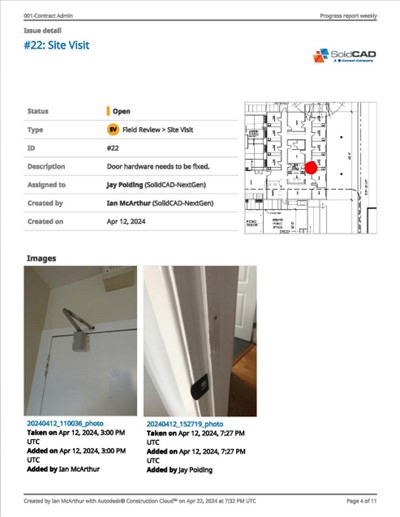
    ACC’s mobile app boosts efficiency by enabling on-site access and updates to project data. Capture photos, record meeting minutes, and review files directly from mobile devices, ensuring seamless real-time data flow and decision-making.

    2. Mitigate Litigation Risks: ACC stands out with its robust version control and unlimited storage capacity. By maintaining a comprehensive record of document histories and project communications, ACC ensures a transparent and verifiable audit trail. This thorough documentation is invaluable in defending against potential litigation, providing clear evidence of project progress and decision-making processes.
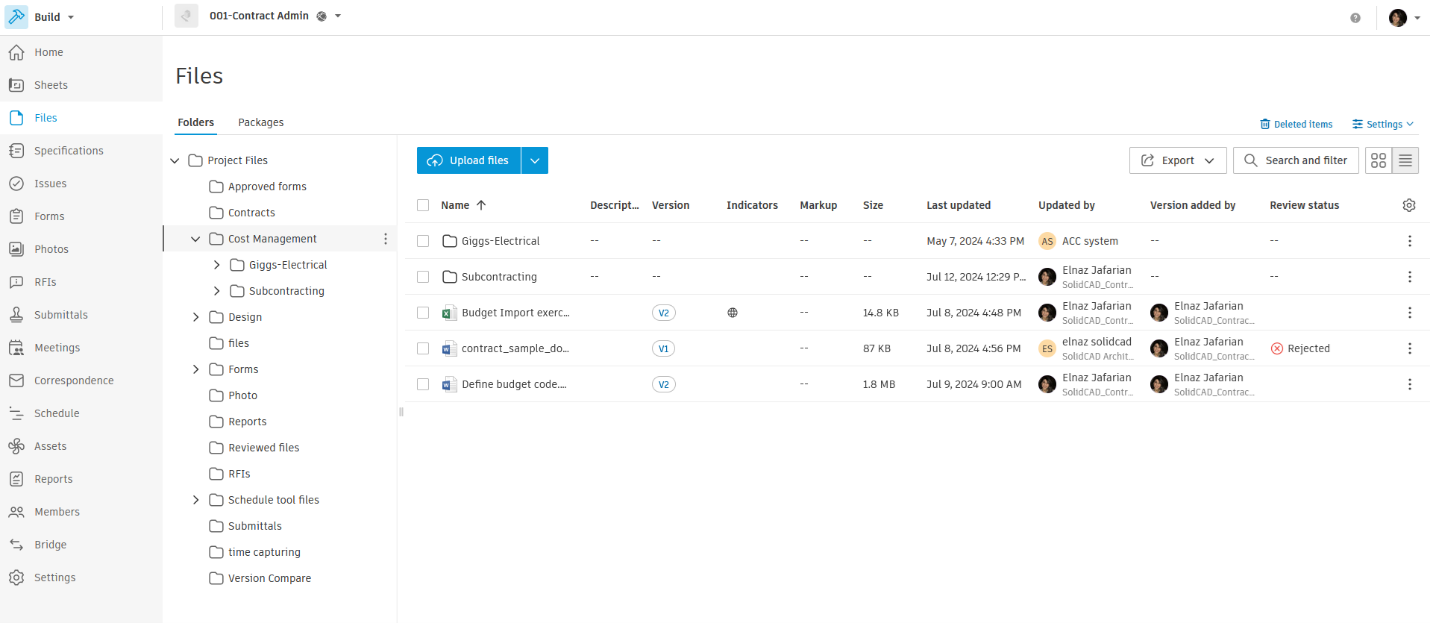
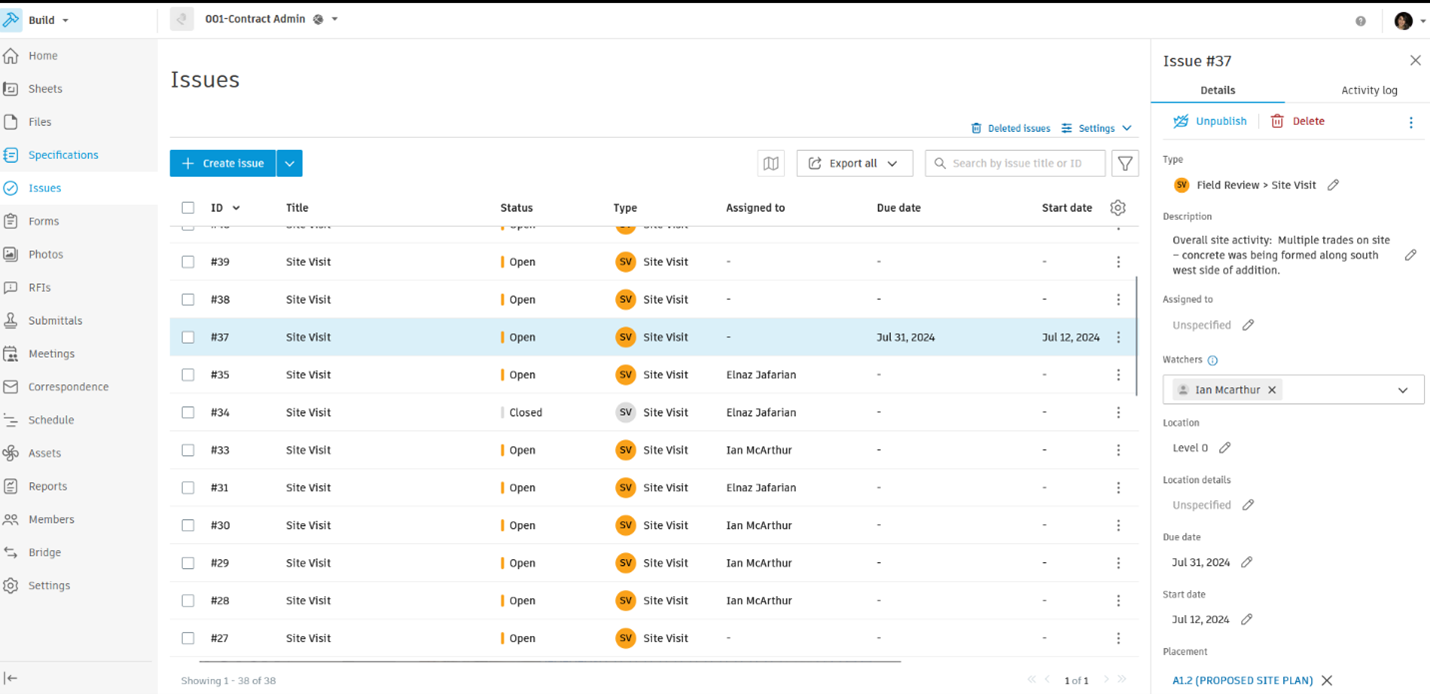
     

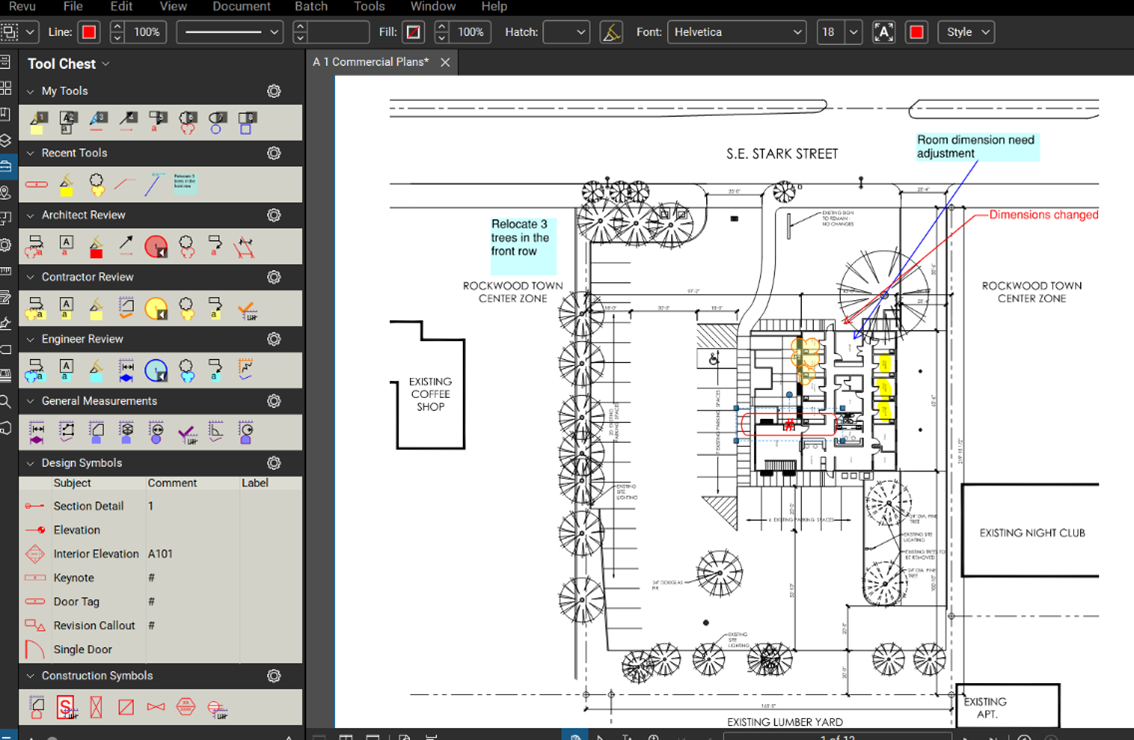
    1. Enhance Collaboration: Bluebeam and other applications complement ACC with top-tier markup, measuring, and estimation tools. Its Studio Sessions feature allows multiple stakeholders to collaboratively review and mark up PDF files in real-time. This capability reduces the need for extensive email exchanges, consolidating all comments into a single, comprehensive report, thus enhancing collaboration in construction.
    The SolidCAD Edge

    At SolidCAD, we partner with Autodesk and Bluebeam to deliver cutting-edge solutions, guiding our clients through their digital transformation journey. As trusted consultants, we offer tailored strategies leveraging ACC and Bluebeam, ensuring our clients utilize the best tools for their unique needs. By adopting these purpose-built technologies, executives and decision-makers in the AECO industry can elevate efficiency, accuracy, and collaboration in their construction and contract administration processes.
    Conclusion

    Transitioning from generic digital tools to specialized solutions like Autodesk Construction Cloud and Bluebeam marks a significant advancement in contract administration. These tools not only address the immediate needs of saving time, reducing costs, and mitigating litigation risks but also pave the way for long-term operational excellence. SolidCAD is here to navigate this transformation with you, ensuring you unlock the full potential of these innovative technologies for your contract administration needs.

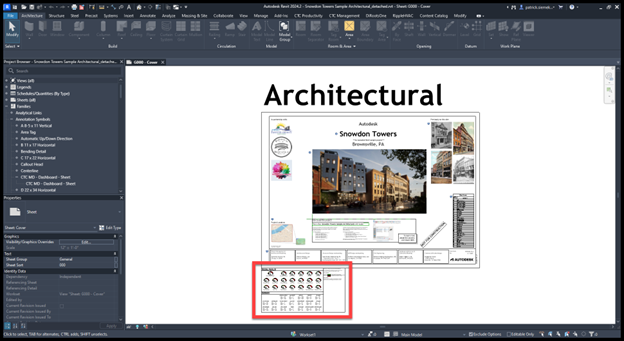
    Optimizing Contract Administration in AECO: Utilizing CTC Model Dashboard for Revit

    Effective contract administration is vital for project success in the AECO industry. By leveraging CTC’s powerful plug-ins for Revit, such as the Model Dashboard, you can enhance project visibility and streamline workflows for project leads, senior architects, designers, and BIM managers.

    The Problem: Navigating Revit’s Complexity

    Revit users often grapple with identifying critical project metrics due to several challenges:

    Lack of Visibility: In Revit, project metrics such as the number of in-place families, line style counts, and total warnings are dispersed across the project, making it difficult to obtain a clear overview. Users may remain unaware of numerous instances in the model that require attention.

    Limited Reporting Tools: Revit does not offer built-in tools for comprehensive error reporting on metrics like in-place families, line style counts, and many others.

    Manual Inspection: Identifying project metrics usually involves manual inspection, which is time-consuming and prone to errors. This process makes it challenging to spot every instance that needs correction.

    No Warning System: Revit lacks real-time warnings or notifications regarding project metrics, their impact on performance, or compliance with best practices. Users often do not receive alerts until issues have escalated.

    Limited Documentation: Many Revit projects suffer from insufficient documentation and standards related to project metrics, complicating the enforcement of consistency and error identification.

    Growing Impact: Failure to adhere to project standards and improper modeling workflows, such as the excessive use of in-place families, can lead to performance issues, increased file sizes, and longer load times. These issues accumulate gradually, making them less noticeable initially.

    To overcome these obstacles, Revit users must resort to a mix of manual checks, custom scripts, and third-party tools. Implementing best practices and standards for family usage is crucial in preventing such issues. This is where the CTC Model Dashboard steps in as a comprehensive solution.

    The Solution: CTC Model Dashboard

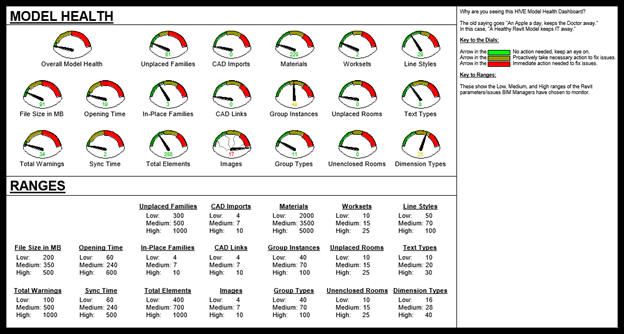
    The CTC Model Dashboard is an innovative Revit feature designed to enhance project oversight by populating custom parameters within a Revit model with specific metrics. This tool provides a visual presentation of over 30 metrics, offering users a clear snapshot of their project’s health.

    Key Features:

    • Visibility of Metrics: Place the CTC Model Dashboard titleblock on your Revit “Starting Page” to display project metrics upon opening a model.
    • Customizable: Use the titleblock as-is or customize it to meet your specific needs.
    • Comprehensive Data Collection: Gather 30+ project metrics, including:
      • Open and save times
      • Quantities of placed and unplaced/unused Revit objects
      • Total warnings
      • File sizes
      • Linked elements
      • Worksets
      • Text types, line styles, dimension types
    • Real-Time Updates: Metrics are updated every time a user saves or syncs the Revit model.
    • Proactive Issue Identification: Helps you spot problems early and address them before they escalate.

    To utilize the CTC Model Dashboard, a license for the CTC BIM Project Suite is required. This suite includes over 19 premium Revit add-ons, enabling users to streamline repetitive tasks, analyze modeling scenarios, extract model data, and much more efficiently within the Revit environment.

    Partnering with SolidCAD

    At SolidCAD, we are more than just software providers; we are your partners in achieving excellence in contract administration. Our team of experts is here to guide you in effectively deploying the CTC Model Dashboard and other CTC plug-ins, ensuring you gain the maximum benefit from these tools. We offer tailored consulting services to help you integrate these solutions seamlessly into your workflows, enhancing your project’s performance and efficiency.

    For any inquiries, reach out to your sales representative or contact us at info@solidcad.ca. Together, let’s transform how you manage contract administration in Revit and elevate your projects to new heights of success.

    Énergir

    Success Stories

    Énergir

    The digital shift: Énergir's journey towards better collaboration, greater data accuracy and greater security.

    Who is Énergir?

    In addition to being the main distributor of natural gas in Québec, Énergir is active in the northeastern United States, where it produces electricity from hydro, wind and solar sources, and is the only distributor of natural gas in the state of Vermont.  As a diversified energy company, its mission is to meet the energy needs of its more than 535,000 customers and the communities it serves in an increasingly sustainable manner. Its vision includes concrete measures – energy efficiency, renewable natural gas, innovative energy complementarity – to remain a key player in the face of climate, economic and social issues for its customers and Québec. Énergir has two objectives: to decarbonize its natural gas network and to be present where and when it is valuable.

    The challenges of collaboration and security in the field

    Énergir’s move to DWG (AutoCAD Map 3D) is a leap forward in better collaboration and greater security in the field, which is essential for companies in the energy sector. This transition allows for seamless interaction between services such as mapping, construction, and instrumentation, facilitating better data sharing and decision-making where accurate, real-time information can prevent accidents and keep workers safe.

    Énergir faced the challenge of switching from MicroStation DGN to AutoCAD DWG to improve positioning accuracy, data accuracy, and safety in the field. This transition required the standardization of internal processes within the CAD environment. The widespread use of MicroStation’s DGN across the organization complicated the transition, as DGNs were still needed for downstream dependent departments. Converting one department at a time was a significant challenge.

    In addition, Énergir’s departments had to adapt to working with DWGs to replace existing workflows that relied on DGNs. External consultants and municipalities also had to work with DWGs provided by Énergir. In addition, it was essential to improve safety in the workplace by providing more accurate and up-to-date information to workers in the field.

    The birth of the digital strategy: “Bullseye”

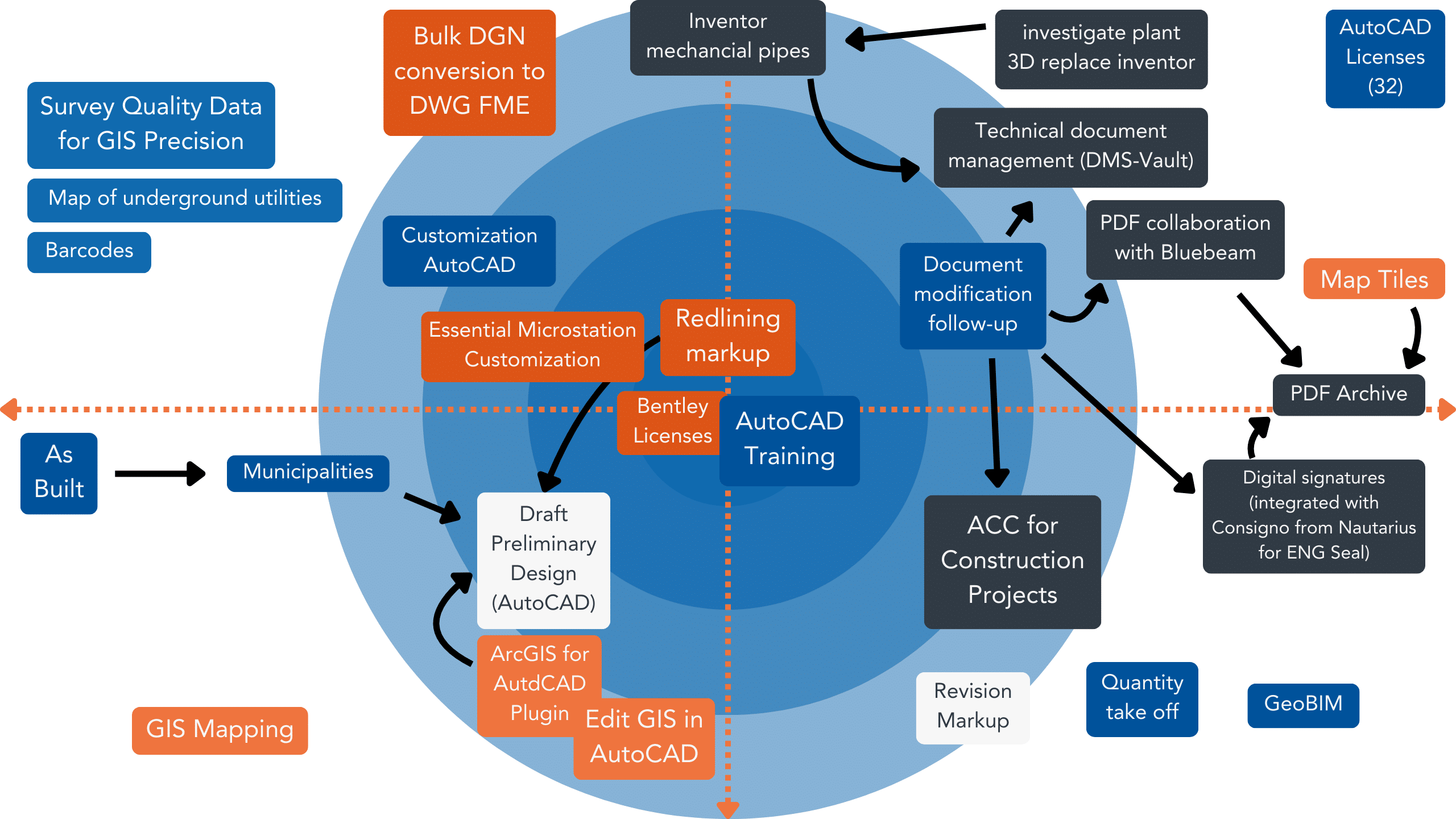
    Énergir’s digital transformation journey began with a close collaboration between the SolidCAD team and the specific needs of the company. This partnership led to the discovery of the “Bullseye” approach, a strategic plan highlighting Énergir’s main objectives and SolidCAD’s targeted solutions. (see: Figure 1 “Bullseye” discovery).

    Figure 1: The “Bullseye” focus of the discovery

    The diagram above vividly illustrates the complexity of this project, highlighting the different components and processes involved, including the interconnected process and data management between the various stages such as the preliminary design, the tagging and modification of documents as well as the integration of this data seamlessly into multiple systems.

    A complete transformation plan solution: Consulting and cutting-edge technology

    The consultation

    Although SolidCAD presented Énergir with a digital strategy, the importance of adopting this change was vital to ensure success and overall efficiency.

    Implementing and customizing the recommended technology was key to ensuring a smooth transition for the entire organization and its stakeholders. We understand that this change has resulted in significant changes to the entire process of their design and field departments.

    To ensure that SolidCAD would support this significant change, we provided comprehensive change management services, which included customized training for 175 users, comprehensive project management, and ongoing mentoring and support. This strategy was designed not only to overhaul Énergir’s design and development processes, but also to ensure the adoption of the new workflow. SolidCAD collaborated with Énergir to revolutionize its entire CAD infrastructure, to allow it to remain on the cutting edge of progress in the digital world facing companies in the energy sector.

    Technology

    SolidCAD recommended two technologies that would better align Énergir’s ideal processes with their sole goals of improving collaboration, data accuracy, and security in the field:

    AutoCAD Map 3D: the game-changer

    AutoCAD Map 3D was recommended for its superior spatial accuracy and GIS integration capabilities. This tool assured to improve the way Énergir managed and accessed spatial data, making it more up-to-date and available in all departments, an essential factor in ensuring the safety of field operations. This integration has streamlined processes and improved data flow across the company, promoting a safer and more efficient work environment.

    Efficiency with AutoCAD Electrical

    AutoCAD Electrical was the ideal solution for Énergir’s Instrumentation group, as it offers an extensive library of symbols and advanced design tools for electrical control systems and piping and instrumentation diagrams (P&IDs). This comprehensive suite of features facilitates the creation of detailed & accurate electrical schematics and system schematics, which are essential for infrastructure planning and maintenance.

    The recommendation to adopt AutoCAD Electrical was driven by its ability to improve the accuracy of data sharing between different departments. With its advanced design tools, the software ensures that all electrical data remains accurate and consistent, minimizing the risk of miscommunications or data errors that could potentially lead to operational risks. In addition, AutoCAD Electrical supports real-time updates and synchronization of information, which is essential for keeping workflows up to date across departments.

    Roadmap to Success: The Phased Approach

    While we had developed an ideal strategy covering their processes, goals, and motivations, the next step was to determine the “how” of implementation. A comprehensive roadmap emerged, outlining a strategic plan filled with personalized recommendations and a well-defined plan that would turn their goals into tangible successes.

    This roadmap not only justifies each suggestion but deepens the reasoning behind it and presents a step-by-step guide to help Énergir in its transformation. More than a plan, it was a vision for Énergir’s innovative future, encompassing all facets of its digital redesign, from the integration of CAD to GIS, to data conversion, the development of web applications for future DGN to DWG conversions, to the implementation of AutoCAD Map 3D and AutoCAD Electrical, to personalized training, assistance and project management.

    Transformative results

    With this successful transformation, Énergir is setting the tone for future projects, maximizing its ability to efficiently convert data from DGN to DWG format. This important milestone in its digital journey sets a new standard for project efficiency and interdepartmental collaboration, aligning perfectly with Énergir’s vision for innovative and efficient solutions.

    A partnership beyond consultation

    Thanks to its comprehensive consulting services, SolidCAD and Énergir have entered into a partnership that goes beyond simple consultation. Together, they created a digital ecosystem that addressed the immediate challenges of collaboration, data accuracy, and security, but also set the stage for sustainable innovation and efficiency.

    This holistic approach to consultation has allowed Énergir to be not only prepared for the digital present, but also ready to become a leader in the digital future of energy.

    Testimonial

    "With a large number of stakeholders and continuous operations to be maintained throughout the process, this digital transformation was not to be taken lightly.

    SolidCAD adapted to our reality and facilitated this digital transition by ensuring an efficient deployment. This was greatly appreciated by the whole organization and the benefits from this are numerous, enabling us to look forward to a bright future with technology.

    With a large number of stakeholders and continuous operations to be maintained throughout the process, this digital transformation was not to be taken lightly. SolidCAD adapted to our reality and facilitated this digital transition by ensuring an efficient deployment. This was greatly appreciated by the whole organization and the benefits from this project are numerous, enabling us to look forward to a bright future with technology.

    - Bruno David, Geomatics Manager at Énergir

    Similar Projects

    Procepack

    PROCEPACK is a firm specializing in the purchase and sale of packaging and process equipment. They serve customers from a wide range of industries from food and cosmetics to pharmaceuticals. They leverage their vast and…
    Modern subway station platform with transparent platform screen doors and a blue and white train in motion behind them. The scene includes safety features like tactile paving and sleek, automated barrier gates, emphasizing urban transit infrastructure and safety.

    Société de Transport de Montréal (STM)

    Public transportation – buses, trains, subways, and more – have a wide range of complex assets that are both mobile and stationary. Upgrades, expansions, and new assets become intricate engineering projects involving a broad array of[...]

    Atlantis Strength

    Atlantis Strength is Canada’s largest commercial strength equipment manufacturer. They employ a careful balance of in-house and out-sourced methodology, and CAD technology that dictates every cut, weld, and part used during their 6-stage manufacturing process.…

    One Click LCA partners with SolidCAD to accelerate decarbonization in Canadian construction

    TORONTO, ON – JULY 3, 2024One Click LCA, a global leader in life-cycle assessment (LCA) and decarbonization software, is pleased to announce a new strategic partnership with SolidCAD, a leading technology consulting and technology provider of CAD, BIM, CAM, cloud-based, data and asset management software solutions in Canada. This collaboration aims to support the rapid decarbonization of the construction industry in Canada, promote educational initiatives, and assist architecture, engineering, and construction (AEC) professionals in scaling their decarbonization efforts.

    One Click LCA has established a reputation as the leading platform for building and infrastructure LCA, offering architects, engineers, consultants, and building material manufacturers a comprehensive and user-friendly solution to evaluate and minimize the carbon impact of their projects. With a cloud-based software solution, One Click LCA automates LCA from building models (BIM) and cost calculation tables, supporting customers in over 170 countries, including industry leaders such as Skanska, WSP, Turner, and Canam.

    SolidCAD, known for its expertise in Autodesk software solutions and its extensive network within the Canadian AEC industry, will play a crucial role in integrating One Click LCA into the planning and execution processes of construction projects across the country. This partnership underscores both companies’ commitment to advancing digital transformation and sustainable development in the construction sector.

    “The partnership with One Click LCA enhances our portfolio with an essential tool for promoting sustainable construction projects and demonstrates our commitment to digital transformation in the construction industry. We are excited to support our customers in effectively reducing the CO2 emissions of their plans,” said Michael Rotolo , National Director of AECO division of SolidCAD.

    “We are delighted to partner with SolidCAD to support the decarbonization of Canada’s construction sector. This collaboration will enable AEC professionals to leverage top-notch engineering capabilities while minimizing their carbon footprints,” said Simon Slater, North American Business Development Manager, One Click LCA.

    Through this partnership, Canadian customers will have immediate access to One Click LCA’s decarbonization platform, backed by SolidCAD’s proven support and expertise in proper modeling, facilitating sustainable development in the construction sector.

    For more information on our resellers and partners, visit our website.

    About One Click LCA

    One Click LCA is the world-leading end-to-end sustainability platform for construction and manufacturing. The software platform decarbonizes and drives sustainability across the construction value chain with scientific, easy-to-use, automated life-cycle assessment (LCA) and environmental product declarations (EPDs) to calculate and reduce the environmental impacts of building, infrastructure, and renovation projects and products. The platform also allows assessment of circularity, life-cycle cost, and biodiversity. One Click LCA is used in 170+ countries, including by blue-chip enterprises like Skanska, WSP, Foster+Partners, LafargeHolcim, ArcelorMittal, Arcadis, ARUP, Geberit, and Saint-Gobain, among others. It offers a unique global database with +250,000 LCA datasets; supports +80 standards and certifications, including LEED, BREEAM, GRESB and other national regulations; and seamlessly integrates with +20 of the most widely used BIM software tools, including Autodesk Revit®, Tekla Structures® and Bentley iTwin®. One Click LCA was founded in Helsinki, Finland in 2001, with a team of +200 people on all continents. Learn more at: www.oneclicklca.com

    Autodesk Desktop Connector

    Version 16.9 of the ADC is now available to download. You can find information about it and download it from this link.

    If you’re upgrading from 15.x, it would be best that you read this document as there have been significant changes.

    In addition to the usual performance and defect fixes, probably the most important new feature is this:

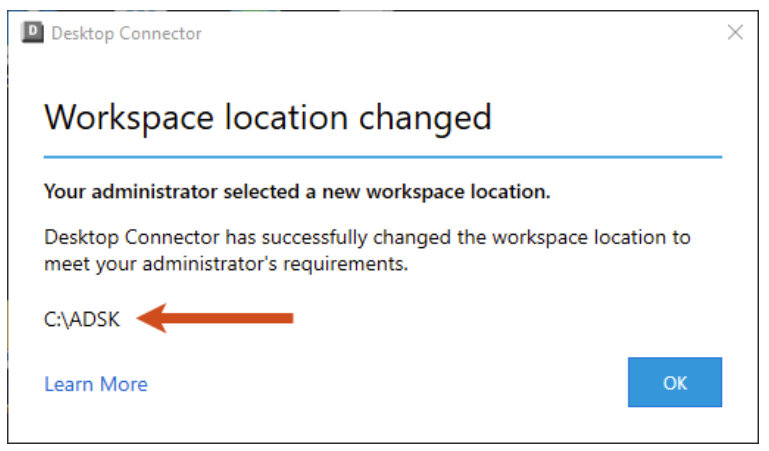
    Administrators now have the ability to set the local workspace location during install/deployment of Desktop Connector. This capability allows admins to enforce a company standard workspace. (CDX-24152)

    For any questions reach out to your sales rep or contact us at info@solidcad.ca

    The Future of Infrastructure: BIM & GIS Integration in Canada

    BIM and GIS: A Powerful Combination

    The integration of Building Information Modeling (BIM) and Geographic Information Systems (GIS) is transforming the approach to infrastructure development and management in Canada and globally. This fusion of technologies offers several significant benefits across various stages of infrastructure projects, such as:

    1. Enhanced Planning and Design: Integrating BIM with GIS allows for a more contextual and informed approach to planning and design. This combination helps in visualizing projects within their real-world geographical context, ensuring that designs are more accurate and aligned with environmental and spatial data​ (EsriGIS)​.
    2. Improved Construction and Operational Efficiency: The integration facilitates better collaboration among stakeholders, leading to more efficient project management. For instance, using BIM and GIS together enhances decision-making, which is crucial for managing the complexities of construction projects. It also enables the creation of digital twins, which serve as comprehensive replicas of physical assets, allowing for better asset management and operational planning​ (EsriGIS)​​ (EsriGIS)​​ (Autodesk)​.
    3. Disaster Resilience and Sustainability: By combining the detailed structural data from BIM with the extensive geographic data from GIS, infrastructure can be designed with better resilience against natural disasters. This integration also supports sustainability initiatives, as it allows for detailed environmental impact assessments during the planning phase​ (Autodesk)​​ (EsriGIS)​.

    Real-World Applications:

    In Canada, significant projects highlight the practical benefits of BIM and GIS integration. For instance, initiatives like the Digital Twin Roadmap for defense infrastructure and the Real Property Spatial Data Warehouse emphasize how these technologies enhance asset management and operational efficiency. These projects showcase the practical implementation and benefits of integrating BIM and GIS in managing complex infrastructures​ (Virtual Building Studio)​.

    The future of infrastructure in Canada looks promising with the continued integration of these technologies, leveraging the strengths of both to create smarter, more efficient, and resilient infrastructures.

    Diving into current Canadian Initiatives

    Our team attended this year’s GeoIgnite conference and got firsthand experience on several key projects and initiatives in Canada take the stage for successful integration of BIM and GIS. During the conference, presentations and topics included:

    • Digital Twin Roadmap: Led by John Hale, Vice-President of BuildingSmart and BIM lead for the Department of National Defence (DND), this project aims to create a comprehensive digital twin of defense infrastructure. The Digital Twin Roadmap integrates BIM and GIS technologies to develop a dynamic, digital representation of physical assets. This enables real-time monitoring, predictive maintenance, and enhanced decision-making, thereby improving the management and resilience of defense assets. By using this digital twin, DND can simulate various scenarios, optimize asset performance, and ensure operational readiness. (GeoIgnite)
    • Real Property Spatial Data Warehouse (RPSDW): This project, spearheaded by Leonardo Parra at Defense Construction Canada, focuses on creating an integrated system for managing spatial data related to defense properties. The integration of BIM and GIS is central to this initiative, allowing for a comprehensive view of real property assets. The RPSDW project aims to streamline data management, improve spatial analysis, and support strategic planning and operations within the defense sector. This integration enhances the accuracy and accessibility of information, facilitating better asset management and decision-making processes. (GeoIgnite)
    • House of Commons Asset Management: Susan Keenliside, Deputy Director at the House of Commons, is overseeing the implementation of BIM processes for public sector asset management. The integration with GIS will significantly improve the management and maintenance of government facilities. By adopting BIM and GIS, the House of Commons can create detailed digital models of its properties, track maintenance activities, and manage spatial data effectively. This integration supports informed decision-making, efficient resource allocation, and proactive maintenance strategies, ensuring the sustainability and longevity of public sector assets. (GeoIgnite)

    These projects collectively represent significant advancements in employing cutting-edge technologies to bolster infrastructure management and resilience in Canada, reflecting a strong trend towards digital transformation in asset management and planning.

    How to get started?

    Are you looking to elevate your infrastructure projects through advanced BIM and GIS integration? Connect with SolidCAD, a strategic partner to BuildingSMART and a seasoned collaborator with major clients like the Department of National Defence (DND). With extensive expertise in GIS consulting, BIM integration, and data management practices, SolidCAD is well-equipped to enhance your project outcomes. Discover how SolidCAD’s comprehensive services can transform your spatial data management and design processes. Visit our GIS Consulting Services page to learn more and contact us today to discuss how we can support your specific needs.

    Let’s collaborate to build smarter and more resilient infrastructure together. Reach out now and take the first step towards leveraging SolidCAD’s deep industry knowledge and technical proficiency for your projects.

    Civil 3D: Subassembly Composer Tip of the Year

    Good day folks, do we have a tip for you today! If you create custom subassemblies with the Subassembly Composer, you’ll want to read on…

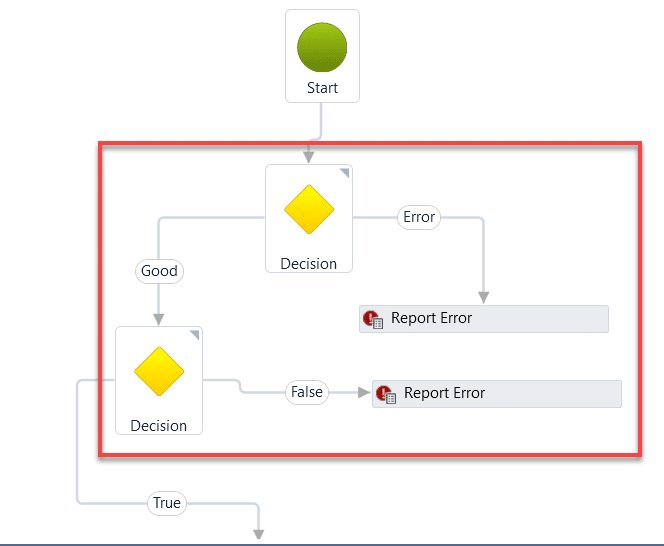
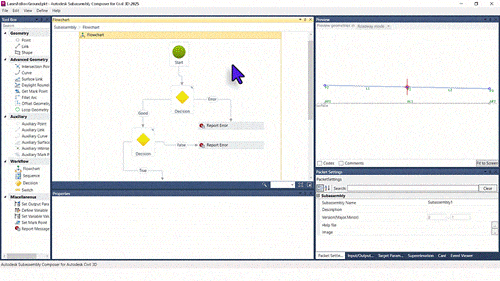
    I’ve created maybe a couple hundred subassemblies for myself and various customers over the years. Some easy and some very involved. In nearly all of them, I’ve wanted to move all or some of the nodes in the flowchart. In this example, I need to move the nodes within the red rectangle.

    It sounds easy, and it is, but only if you know the trick. And many thanks go to my colleague Jae Kwon for pointing this out to me today. Where were you 6 years ago?


    Multiple nodes can be selected by holding the CTRL button while selecting nodes but only one moves.

    Here is the key:

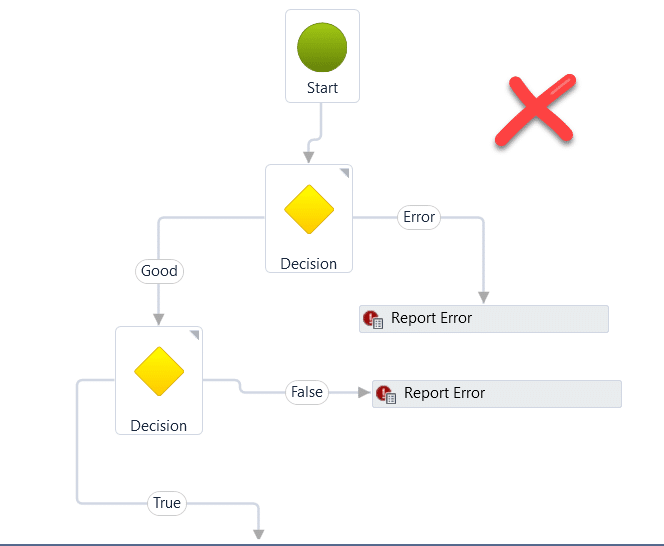
    1. Double click in a blank area. It doesn’t seem to matter where, just double click somewhere, say close to the X in the image.

    2. Select the nodes you’d like to move by holding CTRL and picking them with your mouse. To move all, CTRL+A.

    3. Use the arrow keys (not the mouse) to move them.

    That’s it. Enjoy.

    For any questions reach out to your sales rep or contact us at info@solidcad.ca

    Bridging the Skills Gap: Training Workforce for CAM Automation – Part 1

    Automation is crucial in modern manufacturing, streamlining processes and enhancing efficiency. Despite its importance, there is a noticeable skills gap in the workforce’s ability to effectively utilize this technology. This gap not only infringes on productivity but also affects the industry’s capacity for innovation and competitiveness. An understanding of these issues sets the stage for exploring effective training and development strategies. Implementation of Industry 4.0 trends is helping partners achieve greater outcomes by leveraging all aspects of their daily operations.

    Evolution of CAM

    In the late 80’s early 90’s, creating a lathe bit for a specific application involved either making it yourself or consulting with a colleague. The drawer where these tools were kept often became so heavy that the rollers broke under the weight. This collection represented years of experience and countless hours of work.

    Initially, half-inch carbide blanks were ground down on a deckle wheel to make cutters for specific needs. Over time, machinists built their collections of carbide cutters, each created for a particular need, leading to heavy toolbox drawers. The days of programming directly on the machine controller and manually grinding down tools have largely disappeared. Today’s machinists rely on CAM software to create their programs. The art of 2D programming has evolved into 3D programming due to surfacing capabilities and time savings. As the industry has evolved, manufacturers have continually sought ways to improve their business operations but, to this day, filling gaps in the workforce that can keep up with the rapidly changing industry remains a key challenge for many businesses.

    Strategies for Training the Workforce in Current and Emerging Software

    Addressing the skills gap involves first assessing the specific training needs of the workforce through skills audits and feedback mechanisms. Developing a curriculum that focuses on critical CAM software like Autodesk Fusion can significantly enhance capabilities. Additionally, partnerships with educational institutions, software providers, machine tool partners, and industry leaders can help create comprehensive and practical training modules that are directly applicable to the industry’s needs.

    As the industry has evolved and CAM has become increasingly important in manufacturing, there has been a focus on building upon current processes. Historically, most tasks were programmed with a CAM package, and automation was discussed but implemented differently. Today, forging holistic industry partnerships can create comprehensive and practical training modules.

    Before the current advancements, macros were created to assist with repetitive tasks, such as rest machining toolpaths and setting up programming sessions for new models. Today, there is a push to automate everything, developing processes to advance manufacturing and address the shortage of skilled workers. Automation now includes Artificial Intelligence and plugins to maximize efficiency while minimizing personnel requirements.

    Tools and Technology to Streamline Processes

    Incorporating automation tools such as Make Productivity, CloudNC, and OptiNC can address many common manufacturing pain points. Implementing them can increase both efficiency and accuracy, helping to meet the manufacturing needs of today’s machining processes and ultimately leading to greater sustainability. Integrating these tools into the workforce ensures that employees are proficient in modern technologies, preparing them for current demands and future advancements.

    A notable example of successful workforce transformation is the case of Manufacture Scorpion. Through targeted training and technology adoption, operational efficiency was significantly enhanced. This case study, among others, provides valuable insights into effective strategies and best practices that can be adopted by other firms aiming to leverage CAM automation for business improvement.

    Read more about Manufacture Scorpion’s success story here.

    The Future of CAM Automation and Required Skills

    The future of CAM automation is likely to be shaped by continuous technological advancements. As these innovations emerge, the industry must prepare a workforce that is skilled in current technologies and adaptable to future changes. This requires an ongoing commitment to training and development, ensuring the workforce remains competitive and capable of handling new challenges and opportunities in CAM automation.

    Artificial intelligence is now a significant tool in the industry, changing the manufacturing landscape for future generations. With companies having facilities in various countries, efficient data exchange will be transformed by AI tools that strengthen customer relationships and service delivery. The future of CAM automation will be shaped by technological advancements, requiring a workforce that is adaptable and skilled in current and future technologies.

    To learn more about training and other CAM automation services visit this link or reach out to info@solidcad.ca

    How to Use Colors to Enhance Drawings in Bluebeam

    This story was originally published by on the Bluebeam Blog.

    Several features allow users to use color to make plan documents more efficient to work with

    Bluebeam offers a lot of ways to modify the colors of various objects. The markup and text colors are the simplest to modify. But what escapes many users are the advanced color manipulation features available for images of all kinds.

    Snapshots

    As an engineer, I often must overlay two images over one another to compare them. Whether it’s structural drawings over architectural drawings, or new over existing, or revisions over original scope, you’re sure to benefit from overlays. I’ve watched senior engineers print documents to scale and then use transparent paper to painstakingly sketch out objects of interest that they then awkwardly try to transfer to the other paper.

    Bluebeam simplifies this process and provides high-fidelity options for overlays. First, you need a snapshot to modify. Use the “g” hotkey to take a snapshot of a PDF document that you want to use as the overlay image. Then use “ctrl + v” to paste it on the other image. You can drag the snapshot around to align it exactly where it needs to go.

    As every engineer knows, this can be much harder than it sounds, especially if both images are the same color or if the snapshot turned out opaque. You can click the snapshot and adjust the opacity so you can more easily see what’s behind it. If it has a white background, you can click the snapshot and click the “Change Colors…” button (or right click the snapshot and select “Change Colors…” from the drop-down menu) and then change white to transparent (the box with the red slash through it). This is through the “Modify Colors” Process Type—see image below.

    Changing black to red, removing white from an image

    My personal favorite way to do snapshot overlays is to use the “Colorize” option and change the overlay image to light purple and 70% opacity. The image below shows an example of overlaying mechanical drawings onto the structural backgrounds to locate the mechanical units.

    Sometimes I need more than two things overlaid and I can use different colors for each image to keep it all organized in my mind and on the screen. You can place markups on the screen and trace things as needed and then delete the overlay when you’re done.

    Purple mechanical overlay on structural background

    Photos, Scans

    Right click a photo file, select “Open with,” and then select Bluebeam. Similarly to the snapshot section, you can click the “Document” menu in the toolbar and then select “Color Processing…” to access the same color modification features except that they apply to the document itself (not just markups or snapshot objects). Sometimes I will set a photo from a site visit to grayscale and lighten it up and then markup solutions on top of it for a contractor. Watermarks or similar can also be added to documents in this way. It’s a nice touch to flatten it once it’s in position.

    Another incredibly useful way to use this feature is to make scanned documents (including as-builts) more legible. Look at the difference in legibility between the original blueprint image (left) and the colorized white-to-black version (right). The left image has literally had an acid trip in a basin to create that eyesore, and the right image looks clean.

    Once you have the colors the way you want them, you can also use the “Mask Images” Process Type to then hide the gray artifacts that are residual from the smearing and scanning. What you’re left with is a fresh and clean-looking black-and-white image without all the noise. Then to complete the ouroboros, you can snapshot the image and then adjust its color and opacity as a snapshot overlay.

    Colorizing as-built blueprints

    Color Magic

    There are straightforward color modification features available for standard markups, but Bluebeam isn’t constrained to modifying these objects; it can also modify snapshots, photos and scans in robust ways. Creating overlays is a staple for an engineering office. Fixing up a dark photo or grainy scan is something we can all relate to. I use these features multiple times a day to stay efficient, and you are certain to find relevant applications in your work and daily life, too.

    SolidCAD Partners with Addwize to Transform Digital Document Management across Canada.

    Toronto, ON May 9, 2024– SolidCAD, a prominent leader in technology consulting and thought leadership, is thrilled to announce a strategic partnership with Addwize, experts in digital solutions for Product Data Management (PDM), Product Lifecycle Management (PLM), and Enterprise Resource Planning (ERP). This alliance brings together SolidCAD’s expertise in PLM consulting and Addwize’s advanced document management tools, aiming to transform digital transformation strategies for businesses across industries. Committed to innovation, this partnership promises to equip SolidCAD’s clients with the tools necessary for staying ahead in the rapidly changing digital landscape, driving growth and success for their organizations.

    “I am delighted to announce our partnership with Addwize, a prominent leader in the digitization of PDM, PLM, and ERP systems” states Shaya Ghanbar, Manager of Enterprise Solutions at SolidCAD. “Through this collaboration, SolidCAD and Addwize will join forces to assist our clients in accelerating their digital transformation journey. Leveraging SolidCAD’s consultancy proficiency in PLM alongside Addwize’s automation tools for document and quality management, will provide comprehensive solutions tailored to meet the evolving needs of our clients. This partnership marks a significant step forward in our commitment to delivering innovative and efficient solutions that drive organizational growth and success.”

    This initiative is driven by the growing need for improved digital document management within PLM frameworks. Organizations across Canada are seeking ways to enhance document control and quality assurance, and this partnership directly addresses these needs. The Addwize Microsoft Office add-in, renowned for its capabilities in automating document creation and management, provides essential features such as check-in and check-out, streamlining the entire document lifecycle.

    “We are excited to join forces with SolidCAD to empower Canadian businesses with the tools they need to succeed in their digital transformation efforts,” said a Markus Gundersen, CEO and Cofounder at Addwize. “Our shared goal is to deliver innovative and efficient solutions that not only drive organizational growth but also pave the way for a more digitally adept future.”

    SolidCAD and Addwize are committed to delivering cutting-edge solutions that foster organizational success and growth. Clients can look forward to benefiting from a comprehensive suite of services tailored to enhance digital document management and quality control and help lead to more streamlined operations and improved business outcomes.

    For more information about Addwize, visit the link and learn more.